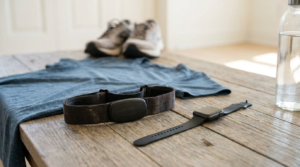
This guide is for anyone running a calorie deficit with a watch or ring involved. That includes people whose food app raises their daily target based on exercise calories, and lifters who keep seeing strength sessions logged as almost nothing or as a ridiculous burn.
The calorie number on your watch is a model, not a measurement
Finish a heavy squat session with long rests and low reps, then check the calorie figure. It will tell you more about your rest periods than about the work you did.
The reason is simple. Your watch doesn’t sense energy. It measures a few things directly:
- Optical heart rate, read through your skin
- Motion, from an accelerometer
It takes the profile you entered (age, sex, height, weight) and feeds everything into a proprietary model. That model converts the signals into an energy estimate.
The heart rate is measured. The calories are derived. Apple, Fitbit and the rest don’t publish how their models work, so nobody outside those companies can say exactly how the conversion is done.
That matters if your food target moves with that number. By the end of this guide you’ll be able to:
- Stop guessing at your calorie target.
- Find your real maintenance from your own scale and food log.
- Use wearable calories for the one job they actually do well.
What you’ll need
- A bathroom scale you weigh on the same way every time. Consistency matters more than precision.
- A food-logging app that lets you set a fixed target and switch off exercise-calorie adjustments.
- Two to three weeks of a reasonably normal routine. Avoid holidays, illness and big training changes.
- A kitchen scale. Logging by eye or with measuring cups adds its own error, and this method depends on your intake figure being trustworthy.
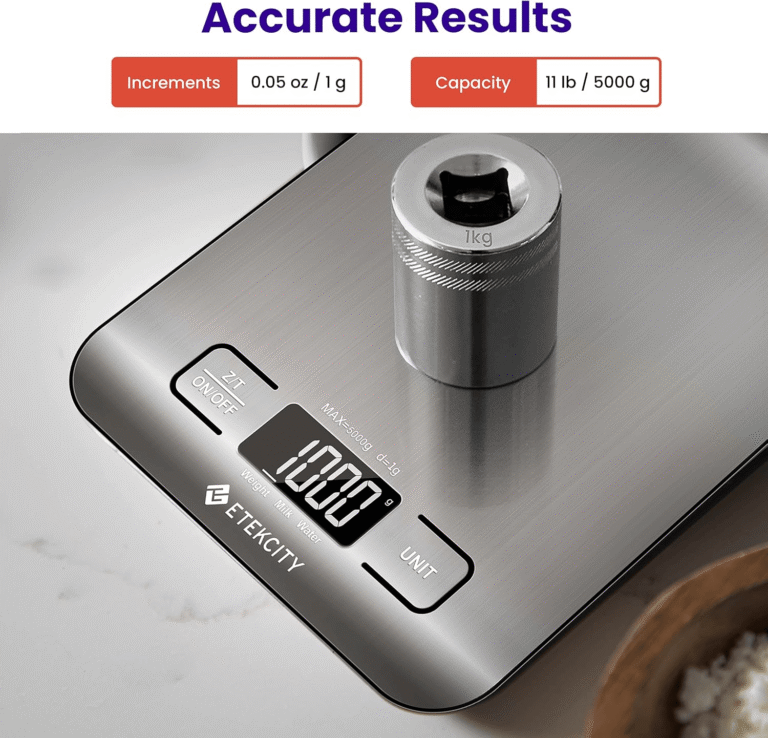
Etekcity
Etekcity Food Kitchen Scale, Digital Grams and Ounces, 11lb
The Etekcity EK6015 is for weighing food and ingredients more consistently during cooking, baking, meal preparation, and portioning. It is particularly useful when a recipe specifies weight rather than volume, when you want repeatable portions, or when you’re deliberately tracking how much food you’re using. The five measurement units also make it practical for recipes and ingredients that use different measurement systems.
Affiliate link — we may earn a commission, at no extra cost to you.
The Etekcity EK6015 is a basic digital food scale with an 11 lb (5 kg) capacity. It reads grams and ounces and has a tare button, so you can zero out the bowl. It’s small enough to live in a drawer.
Its limit: it makes your logging consistent, not perfect. Nutrition labels carry their own tolerances, and a scale doesn’t fix that. Consistency is what this method needs anyway.
Your watch is optional for the calibration itself.
The two- to three-week self-calibration method
1. Work out which calorie figure your app is using.
Wearables usually report two numbers:
- Active calories are the estimated extra burn from movement and exercise.
- Total calories add a resting estimate on top.
That resting figure typically comes from your profile through a formula. It is not measured.
Find out which one your food app pulls in and adds to your target. It worked if you can name the figure and where it shows up in your log.
2. Switch off exercise-calorie adjustments and set a fixed daily target.
This is where a small-looking error does real damage. Here’s an illustrative example with made-up numbers, not a measured error rate:
- You’re aiming for a 400-calorie deficit.
- Your watch overstates a session by 300.
- You eat it back.
Your deficit is now 100. Repeat that most days and progress stalls for no obvious reason.
Pick a target you can genuinely hold. It worked if your target stays the same whether you trained that day or not.
3. Weigh and log everything at that target.
Use the kitchen scale for anything calorie-dense: oils, nut butters, rice, cereal. It worked if your logged daily totals sit in a narrow band rather than swinging by hundreds.
4. Weigh yourself daily under the same conditions.
Weigh in the morning, after the bathroom, before food. Ignore single readings. Water, salt and glycogen move them around. Track a seven-day average instead. It worked if you have a weekly average for every week of the test.
5. Hold steady for two to three weeks.
Week one is often noisy, especially if you’ve just changed what you eat. Don’t adjust anything yet. It worked if you finish with at least two weekly averages after that first week.
6. Derive your maintenance.
Compare your first and last weekly averages.
- Weight stable: your average intake is roughly your maintenance.
- Weight falling or rising: use the common rule of thumb that a pound of body weight is about 3,500 calories. Convert the change into a daily figure and add it to your intake if you lost, or subtract it if you gained.
That rule is a rough approximation, not a precise constant, so treat the result as a working estimate. It worked if you have one number based on what your body actually did.
7. Set your target from that number and re-check periodically.
Subtract your chosen deficit. Maintenance drifts as your weight changes, so re-run the comparison every few weeks using the data you’re already collecting.
If your weight changes quickly and without explanation, see a doctor. Don’t troubleshoot that with an app.
The activities where wearable calorie estimates fail most
Trusting the strength-training number. Lifting raises heart rate through strain and effort, not just oxygen demand. Rest periods then drop it sharply. Wrist flexion under a bar can also disrupt the optical sensor’s skin contact. The result can be wildly high or close to zero, and neither tells you much.
Trusting intervals and HIIT. Optical sensors can lag behind fast heart-rate changes, so the model misses the spikes.
Trusting cycling, rowing and pushing a cart. The wrist doesn’t move the way the model expects for the effort involved.
Ignoring non-exercise heart-rate rises. Heat, stress and caffeine all raise heart rate without much extra energy cost.
Assuming accuracy holds for everyone. Optical readings can behave differently on darker skin and on moving arms. Any accuracy claim only applies to the population and conditions it was tested on.
Steady treadmill running tends to be the kindest case. Heart rate and oxygen use track each other more predictably, and the motion is regular. Even there, the calorie figure is still an estimate.
The one useful way to use wearable calorie numbers
Compare your own sessions to each other. Use the same device, the same activity and similar conditions. If this week’s tempo run shows more active calories than last week’s at the same pace, that’s a rough signal worth noticing.
Never compare a wearable figure to a food label. They are two different kinds of number from two different error sources.
On hardware:
- A chest strap gives a cleaner heart-rate input, particularly for intervals. The calories are still modelled from it. See our piece on wrist vs chest strap heart rate accuracy.
- Resting metabolic rate testing by indirect calorimetry measures your gases at rest. It tells you about resting burn, not your full daily total. Your three-week experiment estimates the number you actually need.
The same trap shows up with CGMs sold to people without diabetes: a measured signal gets dressed up as a metabolic verdict.
FAQ
The questions people ask most when a watch is part of their diet.
Conclusion
You can now separate what your wearable measures from what it infers. You can switch off the feature quietly eating your deficit. And you can set a calorie target from your own weight trend instead of a black-box estimate.
The verdict:
- Skip eating back watch calories.
- Keep the watch for heart rate and comparing sessions.
- Buy a kitchen scale before any new gadget.
If your bottleneck is a calorie target that keeps moving, the fix is two boring weeks of consistency, not better hardware.
FAQ
Are Apple Watch calories accurate?
Heart rate on an Apple Watch is measured. Calories are estimated from heart rate, motion and your profile using a model Apple doesn’t publish. Accuracy depends on the activity: steady running suits the model better than lifting or intervals. Treat the figure as an estimate, not a measurement.
Are Fitbit calories burned accurate?
Fitbit is in the same position. The sensor inputs are measured, the calorie output is modelled, and the model is proprietary. Neither Fitbit nor any other consumer wearable converts exercise data into a reliably precise calorie figure.
Should I eat back exercise calories?
Not by default. Set a fixed target from your own maintenance estimate and keep it on training days. If you’re consistently hungry or your training suffers, raise the fixed target slightly. Don’t let a modelled number move it daily.
Why does my watch show almost no calories for strength training?
Long rests drop your heart rate. Lifting also doesn’t produce the motion pattern the model is built around. Other sessions can read high because strain raises heart rate. Neither figure is reliable for lifting.
What’s the difference between active and total calories?
Active calories are the estimated burn from movement. Total calories add a resting estimate, usually calculated from your age, sex, height and weight. Check which one your food app adds to your target.
Would a chest strap fix my calorie numbers?
It gives a better heart-rate input, especially during intervals. The calorie figure is still modelled from that input, so it improves the estimate’s raw material, not its nature.