If your screen becomes harder to read by mid-afternoon and you’ve started wondering whether the answer is new glasses, a new monitor or blue-light filters, this is a diagnosis first: three tests you can run in two minutes, then a fix ladder that begins with moving furniture.
Introduction
Most people buy a desk lamp to fix eye strain without ever establishing what kind of lighting problem they have. There are three common ones, and they need opposite solutions. Reflected glare — the window you can see in your own panel — gets worse when you add light. Poor contrast between a bright screen and a dark room gets better when you add light, but in the right place. Direct glare from a bare bulb or an uncovered window in your field of view isn’t fixed by a lamp at all.
I learned this in the least efficient order available. My desk was pushed against a window because that was the only wall it fitted, the laptop panel was glossy, and my response was to buy the brightest task lamp I could find. It made the afternoons worse. Rotating the desk ninety degrees, which cost nothing, did more than the lamp ever did.
By the end of this you’ll know which of the three problems you have, what the free fixes are, and whether a monitor light bar or a high-CRI task lamp is worth the money in your particular room.
What you’ll need
Nothing you have to buy. The diagnosis stage is free, and for a lot of people so is the fix.
- Two minutes at the time of day it actually hurts. Testing at 9am tells you very little about hour seven. Do this mid-afternoon, in the seat and posture you genuinely use, not the upright version you adopt when someone’s watching.
- A way to turn the screen fully dark. The power button is best. A full-screen black image is good enough.
- A white document open on screen — a blank word processor page or a plain search results page.
- A sheet of plain paper to compare against that white page.
- A book, a folder or a piece of cardboard as an improvised shade for testing whether blocking a light source helps before you spend anything on shading it properly.
- Whatever blinds, curtains, lamps and floor lamps you already own. Most of the fix ladder below is rearrangement.
A tape measure is useful if you end up moving the desk, and a phone camera helps if you want a before-and-after record of reflections.
Steps
1. Turn the screen off and look at it
Sit normally and study the dark panel. Look for shapes: a window, a ceiling fitting, a lamp over your shoulder, a pale wall, your own face. Every shape you can see is light bouncing off the panel back into your eye, and it doesn’t vanish when the screen comes on — it lays a thin wash of light over the dark pixels, which is exactly where text gets its edges. Contrast drops, the edges soften, and you compensate by squinting and leaning in. That’s the headache.
You’ve done this properly when you can point at the physical source of every shape. Glossy laptop screens show far more of them than matte monitors, which is why laptop-only setups feel disproportionately bad in a bright room.
2. Compare the screen with the wall behind it
Put a white page on screen, then let your eyes go slightly soft and compare that page with the wall behind the monitor. Hold your sheet of paper up beside the screen if it helps. If the screen looks like a lightbox in a cave, the contrast range in the room is too wide: your pupils resize every time your gaze moves between screen and surroundings, and that constant adjustment is tiring in a way that’s hard to notice while it’s happening. Cornell’s CUergo ergonomics guidance and OSHA’s Computer Workstations eTool both frame the goal as balance between the screen and its surroundings, rather than simply more or less light. Aim for the screen looking a little brighter than the wall, not dramatically so.
3. Find every light source in front of you
Sit, look straight ahead, then sweep your eyes slowly across everything in front of and beside you without turning your head. Anything brighter than your screen in that arc — an uncovered window, a bare bulb, a white wall in full sun — is direct glare, which is a separate problem from the reflections in test one and needs a separate fix. The UK Health and Safety Executive’s DSE guidance treats both as workstation design faults rather than personal sensitivities, which is a useful reframing if you’ve been assuming your eyes are the issue.
4. Move the desk before you move any money
The standard advice — window to the side of you, not in front of you or behind you — comes from both the OSHA eTool and HSE’s DSE guidance, and it remains the single most effective free fix. Behind you, the window lands in your panel. In front of you, it’s direct glare.
If the room dictates the desk position, and in small apartments it usually does, you still have options short of a full rearrangement. Rotating the desk fifteen or thirty degrees, or sliding the monitor a foot along the desk and angling it, often moves a reflection off the panel entirely. Rerun test one to check. If the reflection has gone, you’re done, and you’ve spent nothing.
5. Match the screen to the room, not to the factory setting
Most monitors ship far brighter than a normal room needs. Bring brightness down until the white page looks like paper rather than a light source. If the text now looks dim and grey, the room is too dark — that’s the signal to add ambient light, not to push brightness back up. The exception is a genuinely bright room in daylight, where you do need the brightness, and the work is on the windows instead.
6. Get overhead light off the panel and out of your eyeline
If a ceiling fitting is reflecting in the screen, a small tilt of the monitor often moves the reflection off it; if the fitting is in your forward view, the better move is to stop using it as your main light. Bouncing a floor lamp off the ceiling or a wall gives you the same amount of light in the room with no bright object in your sightline. Sheer curtains do the same job for a window: they diffuse rather than block, which keeps the daylight and loses the hotspot.
7. Add a task lamp only now — and shade it
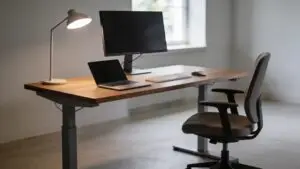
A task lamp exists to light your desk, your hands and your paperwork, not your screen. Place it to one side, roughly level with or slightly behind the plane of the monitor, head aimed down at the surface, on the opposite side from your writing hand so you don’t work in your own shadow. The test is the one you already know: switch the screen off with the lamp on. If you can see the lamp in the panel, it’s in the wrong place. Move it and test again.
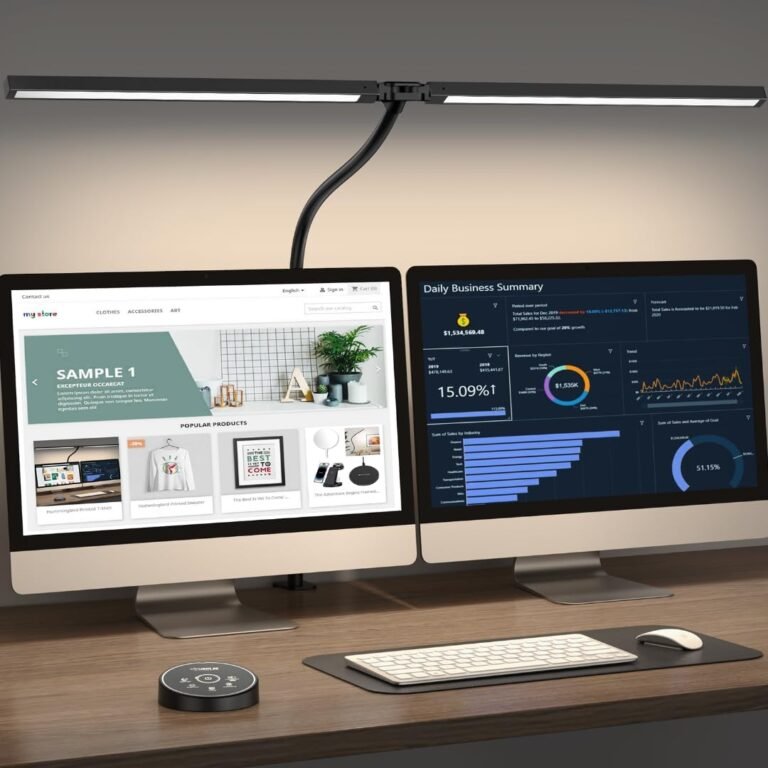
On a wide or dual-monitor desk, a single-head lamp tends to light one corner and shadow the rest, and its base eats the space you wanted. A clamp-mounted, twin-head lamp solves both constraints at once.
Pzloz
The Pzloz LED Desk Lamp is for people who need broad, adjustable lighting across a computer desk, drafting table, or other large workspace. It makes particular sense for dual-monitor and ultrawide setups, where a conventional desk lamp may illuminate only one portion of the work surface. The clamp mounting also suits people who want to keep their desktop clear rather than sacrifice space for a lamp base.
Affiliate link — we may earn a commission, at no extra cost to you.
Pzloz gives this one a 24W LED system with two heads that extend to around 31.5 inches, five colour temperatures from roughly 3000K to 5500K, five brightness levels and a remote, with a clamp that fits desk edges up to about two inches thick — the manufacturer’s figures, not something I can verify. The relevant part is the geometry: no base on the desk, and two heads you can aim independently, which means you can light the left and right halves of a wide desk while keeping both beams off the panels. It’s the wrong buy if your desk edge is too thick or rounded for the clamp, if your desk is small enough that a cheap shaded lamp placed correctly does the same job, or if your actual problem is a window — no lamp fixes that.
8. Consider bias lighting or a monitor light bar last
Bias lighting — light behind the monitor, aimed at the wall — addresses the test two problem specifically: it lifts the brightness of the surround so your pupils aren’t constantly renegotiating. A monitor light bar does something related but different, throwing a shaped pool of light forward onto the desk from above the screen while keeping its own emitter out of your view and, if aimed properly, off the panel. That geometry is the thing you’re paying for, and it’s genuinely hard to replicate with a conventional lamp on a shallow desk.
Neither does anything at all for reflected window glare or a bare bulb in your eyeline. Fix those first, then decide whether you still have a problem left to spend on.
Common mistakes
Aiming a bright lamp at a glossy laptop screen. This is the most common self-inflicted version of the problem. Laptop panels are glossy and sit low, so they act like a mirror angled up at your ceiling and your lamp. Adding light in front of the screen adds reflections, and the perceived fix — more brightness — makes the contrast mismatch worse.
Copying the dark-room, bright-screen look. It photographs beautifully. It’s a poor place to read text for seven hours, because it maximises the gap between screen and surround that test two is designed to catch.
Buying blue-light glasses first. The American Academy of Ophthalmology has been clear that the discomfort people describe as digital eye strain isn’t attributed to blue light from screens, and it doesn’t recommend blue-light-blocking lenses for it. If glare and contrast are what’s hurting you, a filter over your eyes won’t remove the window from your panel.
Removing all ambient light. Killing every lamp does reduce reflections, and it also leaves you reading a bright rectangle in the dark. You want less light in the wrong places, not less light overall.
Practical tips
Older eyes need more light, not less. The lens yellows and stiffens with age and less light reaches the retina, so the dim-room setups that look striking online are frequently unusable past forty-five. If you’re in that group, raise ambient light and pull screen brightness down to meet it, rather than the reverse.
Colour rendering matters more for paperwork than for text. A high-CRI lamp doesn’t make a screen easier to read — the screen makes its own light. It makes printed pages, samples, sketches and anything you’re judging by colour look correct. Buy for that reason, not for eye strain.
Take the breaks. The AAO’s long-standing suggestion is the 20-20-20 pattern: every twenty minutes, look at something about twenty feet away for twenty seconds. It costs nothing and it addresses the focusing muscles, which no lamp can.
And one thing worth knowing if you work late: the bright, cool lighting that suits a mid-afternoon spreadsheet is not what you want at ten at night. A lamp with adjustable colour temperature lets you drop it warmer in the evening, which your sleep will quietly thank you for.
Conclusion
You now have a way to tell the three lighting problems apart, and an order of operations that puts the free fixes first. Tonight, at the hour when your eyes usually start to complain, turn the screen off and look at it for thirty seconds. Name every shape you can see in the black panel. Whatever you find there is the first thing to move — and moving it is free.
Reader questions
Frequently Asked Questions
Does a monitor light bar actually reduce eye strain?
It can, but only for one specific cause: too much contrast between a bright screen and a dark surround. Its advantage over a normal lamp is geometry — it sits above the screen and throws light forward onto the desk while keeping its emitter out of your sightline and its beam off the panel, which is hard to achieve with a conventional lamp on a shallow desk. If your problem is a window reflecting in your screen, a light bar will not touch it.
Should I just work in a dark room with a bright screen?
No. It removes reflections, which is real progress, but it replaces them with a large contrast mismatch — your pupils adjust constantly as your eyes move between screen and room. Both the OSHA eTool and Cornell’s CUergo guidance describe the goal as balance: the screen slightly brighter than its surroundings, not dramatically brighter. A dim room with a bright screen is the shape of setup that photographs well and reads badly at hour seven.
Will blue-light glasses help my tired eyes?
The American Academy of Ophthalmology does not recommend blue-light-blocking lenses for digital eye strain, and attributes the symptoms to how we use screens rather than to blue light itself. If your screen has a window in it, or your room is too dark relative to your monitor, glasses don’t change either fact. Run the three tests before spending anything on lenses.
My desk has to face the window. What can I do?
Quite a lot, short of moving the desk. Rotating the desk fifteen or thirty degrees is often enough to take a reflection off the panel; so is sliding the monitor a foot sideways and angling it. Sheer curtains diffuse the daylight without blacking out the room, and adjustable blinds — which HSE’s DSE guidance specifically mentions — let you cut the hotspot at the hour it appears rather than all day. Rerun the dark-screen test after each change to see whether it worked.
Is a high-CRI desk lamp worth the extra cost?
It depends on what’s on your desk. High colour rendering makes printed pages, artwork, fabric and anything judged by colour look accurate, and if that’s part of your work it’s worth paying for. It does nothing for on-screen text, because the screen generates its own light. Placement, shading and adjustable brightness affect your comfort far more than the CRI number does.
How do I know a change has actually worked?
Two checks. Switch the screen off and confirm the reflection you were chasing is gone. Then look at a white page on screen and confirm it reads as paper rather than a light source against the wall behind it. If both hold at mid-afternoon, not just in the morning, the change is real.