This is a one-week diagnostic for desk workers with an aching forearm, a sore thumb base or tingling fingers. Work through it before you buy a vertical mouse, a trackball or a split keyboard.
Introduction
Most advice on mouse and keyboard wrist pain starts with a shopping list. In my experience the real problem is usually closer to hand. The mouse may sit too far out, the keyboard may be tilted up on its feet, or a pointer setting may make your arm travel twice as far as it needs to.
I once bought an ergonomic mouse to fix a forearm ache. The ache was coming from reaching past a full-size keyboard’s number pad, and the new mouse sat exactly as far away as the old one.
This guide assumes your screen and laptop arrangement is already workable. If it isn’t, start with our laptop ergonomics guide. By the end of this one you’ll know which movement provokes your symptom. You’ll also know whether any device is worth buying and when to stop adjusting and see someone qualified.
What you’ll need
- Your current mouse, keyboard and desk
- A notebook or phone note for a short daily log
- Access to your operating system’s pointer speed setting
- One week of normal work
Nothing here needs buying. That’s deliberate.
Steps
1. Check for red flags before anything else. Stop and book a clinician if you have any of these:
- numbness or tingling that persists or wakes you at night
- weakness, dropping things or trouble with buttons
- visible swelling
- symptoms that began with a fall or injury
- pain spreading from the neck
- pain that doesn’t ease with rest
These can point to nerve involvement, including carpal tunnel syndrome, and a mouse can’t diagnose that. Continue only if none apply.
2. Log a baseline for two days. Note three things each day: where it hurts, when it starts, and what you were doing. Separate the times you were typing, mousing, scrolling or on the trackpad. It worked if you can name the task that comes before the symptom.
3. Move the mouse closer. Pull it in until your elbow can stay near your side, with your upper arm roughly vertical. Reaching out to the side holds the shoulder and forearm under constant low load. It worked if mousing no longer pulls your arm away from your body.
4. Shift or shrink the keyboard. This is the fix almost nobody mentions. On a full-size keyboard, the number pad pushes the mouse several inches to the right.
As a free test, slide the keyboard left until the letter keys sit centred in front of you. It worked if the mouse lands closer to your body. If it does, a tenkeyless or compact keyboard is really a mouse-position purchase.
5. Flatten the keyboard. Fold the rear feet away. Raised feet tip the hand backwards into wrist extension, which narrows the space the tendons and median nerve pass through. A flat board, or one tipped slightly away from you, keeps the wrist straighter. It worked if your knuckles sit roughly level with the back of your wrist.
6. Raise pointer speed. Increase your operating system’s pointer speed, or the mouse’s DPI, a notch at a time. Stop when you can cross the screen with a small movement and still land on targets. Low sensitivity forces large, repeated arm sweeps. It worked if wide arm movements disappear without you overshooting buttons.
7. Remove the wrist rest for three days. Not forever, just as a test. It worked if the symptom eases, and the next section explains why that happens.
8. Name the provoking movement. Review your log against these patterns:
- Aching along the top of the forearm while mousing suggests palm-down rotation, called pronation.
- Pain at the thumb base suggests trackpad gestures, trackball thumbs or side buttons.
- Pain on the little-finger side while typing suggests the wrist bending outwards to reach keys, called ulnar deviation.
- A sore index finger suggests clicking or scroll-wheel load.
It worked if one pattern clearly fits. If none do, see step 1 again.
Common mistakes
Treating the wrist rest as a resting place. A wrist rest helps when it supports the heel of your palm during pauses between movements. It becomes a problem when you pivot on it while mousing or keep your wrist pressed on it while typing. That puts sustained pressure on the soft underside of the wrist, close to the carpal tunnel. It also tends to bend the hand upwards.
If removing it helped, you were probably using it as a pivot. If you bring it back, hover while working and land only when you stop.
Buying by category instead of movement. "Ergonomic" describes a shape, not a fix for your particular strain. Each device trades one load for another.
Changing everything at once. If you change several things together, you won’t know which one helped.
Practical tips
Match the device to your movement.
Vertical mice turn the hand to a handshake angle and reduce pronation. They suit forearm-top aches. They tend to be weaker for fine precision work and fast gaming flicks. If you game at the same desk, keep a conventional mouse for games rather than forcing one device to do both.
Trackballs remove arm travel entirely. Thumb-operated models move the work onto the thumb, though, which is a poor trade if thumb-base pain is your problem. Finger-operated trackballs exist and may suit you better.
Split and ortholinear keyboards let each hand sit in line with its forearm. That targets ulnar deviation. They do little for mouse-related pain and can make it worse if their width pushes the mouse further out.
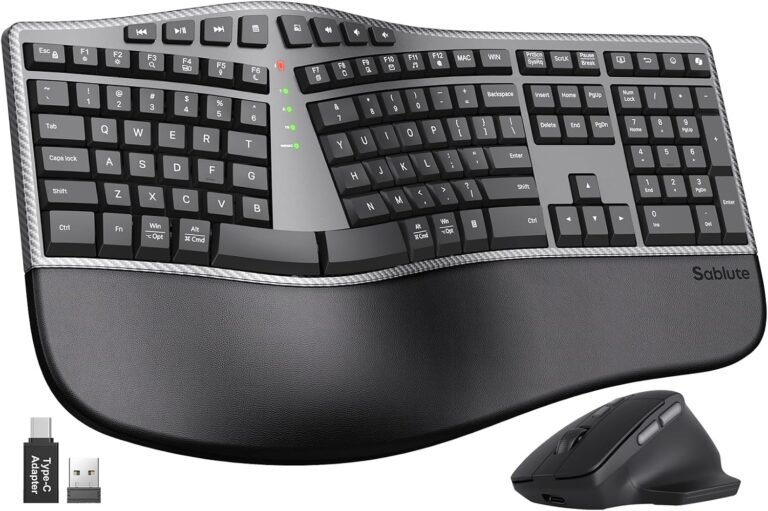
The SABLUTE combo below shows that trade-off clearly. It pairs a curved split layout and adjustable tilt feet with a full number pad. The keyboard measures 19 inches across and comes with an attached padded wrist rest. It could suit someone who needs a numpad and whose pain comes from typing angle. It’s the wrong fit if your problem is mouse reach. The included mouse offers four DPI settings, from 800 to 2400, which helps with step 6.
SABLUTE
Ergonomic Wireless Keyboard and Mouse, Rechargeable, Split, Win/Mac
This keyboard and mouse combo is for people who spend long periods working, writing, or navigating a computer and want a more ergonomic alternative to a conventional flat keyboard and standard mouse. It is suited to office desks, home offices, remote-work setups, and extended typing sessions.
Affiliate link — we may earn a commission, at no extra cost to you.
Small hands change the decision. Many vertical mice are sized for medium or large hands. Measure your hand from wrist crease to fingertip and check the maker’s sizing before buying. A mouse that’s too big makes you claw at it, which is its own strain.
Budget for the adaptation cost. Expect roughly two to four weeks of slower, clumsier work with any new device. That’s a common experience rather than a measured rule. Introduce a new device for part of the day, not all of it at once. Mild unfamiliarity is normal. New pain somewhere else is a signal to stop.
Spend in this order:
- Free changes
- A tenkeyless keyboard if step 4 helped
- A device matched to your movement
- A split keyboard last
Our upgrade-order guide covers larger budgets.
FAQ
The questions readers most often ask about wrist rests, vertical mice and trackpads are answered below.
Conclusion
You should now be able to rule out the symptoms that need a clinician. You can make the free positional changes and name the movement that provokes your pain. Any purchase can then be matched to that movement rather than to a category.
Today, start with one step: slide your keyboard left and see where the mouse ends up.
FAQ
Do wrist rests help wrist pain?
Sometimes. They help when they support the heel of your palm between movements. They can make things worse when you pivot on them or keep your wrist pressed down while working. Removing yours for a few days is the simplest way to find out which applies to you.
Is a vertical mouse good for wrist pain?
It can be, particularly for aching along the top of the forearm linked to palm-down rotation. It is less suited to precision work and gaming. It won’t fix pain caused by reaching too far for the mouse.
Why does my thumb hurt from using a mouse?
Common causes are side-button use, thumb-driven trackballs, trackpad gestures, and gripping a mouse that’s too small or too large. Log which of these comes before the pain, and avoid any device that loads the thumb further.
Are trackpads better than a mouse for wrist pain?
Not necessarily. Trackpads reduce arm travel, but heavy gesture use concentrates repeated work on the fingers and thumb. Raising tracking speed and swapping between a trackpad and a mouse during the day may spread the load.
When should I see a doctor instead of changing my setup?
See a clinician if you have persistent or night-time numbness, weakness, swelling, pain after an injury, or symptoms that don’t ease with rest. You should also go if a week of changes makes no difference.